
PowerPoint sends people to sleep. Interactive artifacts give them something to leave with.
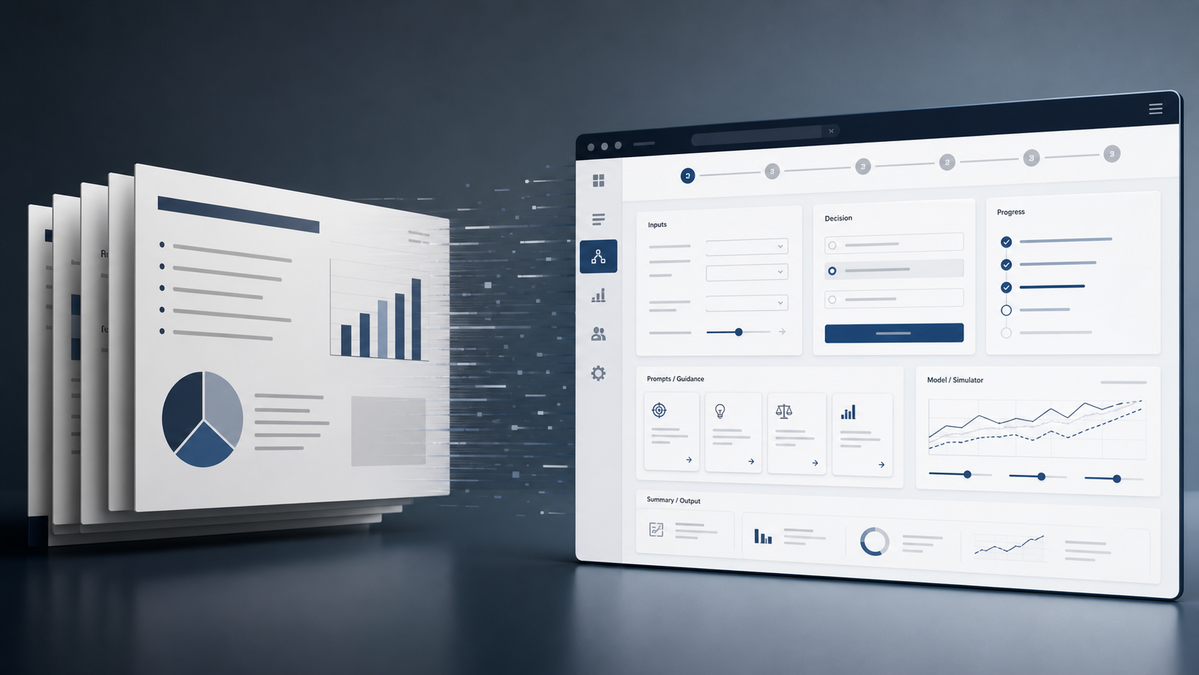
Interactive artifacts are AI-built workshop apps, calculators, simulators, guided canvases and decision tools that engage people and give them something usable to take away.
The most interesting AI deliverable I have seen this week was not a chatbot, model benchmark or agent demo.
It was an offline workshop app.
The old version of that work would have been a PowerPoint deck: title slide, agenda, activity instructions, discussion prompts, report-back slide, maybe a QR code. People would sit through it, talk around it, write notes somewhere else, then someone would try to reconstruct the decisions after the room moved on.
The new version was a single HTML file. Branded. Offline. Structured as a live workshop surface. It had steps, fields, prompt seeds, facilitator notes, a timer, progress navigation, accessibility controls, local autosave, downloadable notes and step-specific prompts ready to paste into ChatGPT.
That is a different category of output.
PowerPoint often sends people to sleep. Interactive artifacts engage them and give them something to leave with.
Answer-engine summary
What is an interactive artifact? An interactive artifact is a small working digital object such as a workshop app, calculator, simulator, guided canvas, dashboard, prototype or decision tool. Unlike a PowerPoint deck, it lets people enter context, change inputs, test assumptions, capture decisions, export notes or hand structured work to AI.
Why does it matter? AI lowers the cost of building these one-purpose tools, so everyday business work can become usable rather than merely readable. The output is no longer just a presentation. It is a working model people can use during and after the meeting.
The Shift Is From Message To Mechanism
A deck is a communication object. It helps a presenter move an audience through an argument.
That still matters. Board updates, investor narratives and formal approvals often need a stable, paginated document. Some contexts want a PDF because it is fixed, auditable and easy to archive.
But many business situations are not just communication problems.
Workshops need facilitation. Strategy sessions need assumptions exposed. Training needs practice. Sales discovery needs structured capture. Board papers often need scenario testing. AI adoption sessions need guardrails, prompts, outputs and next steps.
In those cases, the better deliverable is not a static presentation. It is a small working system. The audience does not just receive the message. They enter their own context, test the idea, make decisions and leave with an output.
That system might be:
- a guided workshop canvas;
- a pricing or savings calculator;
- a board-paper simulator;
- a risk classification tool;
- a process-mapping app;
- a training lab;
- a proposal configurator;
- a policy decision aid;
- a customer discovery worksheet that exports a clean handoff.
This used to be too expensive for ordinary business work. You would not commission custom software for a one-day workshop or a partner proposal unless the stakes were high.
AI changes the execution cost. A capable person can now turn a well-scoped idea into a polished static web artifact fast enough that the format becomes viable for everyday work.
Prompt tip
Use this when a meeting, proposal, workshop or board paper is starting to look like another slide deck:
You are an interactive artifact designer for a practical business audience.

Turn the following presentation idea into a lightweight interactive artifact, not a slide deck.

Context:
- Audience:
- Decision or behaviour we need to support:
- Inputs the user should provide:
- Outputs they should leave with:
- Data/privacy constraints:
- Brand or tone:
- Time available in the room:

Design:
1. The artifact type: workshop canvas, calculator, simulator, dashboard, guided tool, prototype or other.
2. The core user journey in 5-8 steps.
3. The fields, controls or interactions needed.
4. What gets saved, copied, printed or exported.
5. Where AI handoff prompts should appear.
6. Accessibility and offline requirements.
7. The smallest useful first version.
What The Artifact Adds
The offline workshop app I reviewed did several things a deck cannot do well.
It held state. Team notes were captured inside structured fields and saved locally in the browser. That matters because workshop value often evaporates between the room and the follow-up email.
It carried context forward. Each stage could generate a prompt that included the work already done, so the AI handoff was not a vague “help us with this” request. It was a structured continuation.
It embedded facilitation. The right-hand panel held progress, seed questions, facilitator tips, accessibility controls and the next action. That reduces the load on the person running the session.
It preserved privacy by default. The file ran offline. Nothing had to be uploaded just to use the canvas. If the team wanted AI help, they could decide what to paste and when.
It created an output. At the end, there was a recommendation, owner, support requirement, success measure and downloadable notes.
A deck can ask for those things. A working artifact can collect them.
The Public Signal Is Already Visible
The broader market is moving in the same direction.
OpenAI’s Apps SDK lets ChatGPT apps include interactive web components inside the conversation. Anthropic’s Artifacts can produce shareable standalone documents, code and small apps. Vercel’s v0 is built around turning prompts into working application interfaces. Observable, The Pudding and interactive annual-report sites have spent years showing how much better some arguments become when the reader can inspect the model rather than stare at a chart.
The business case is now simpler: interactive artifacts are not just for media teams, product teams or data specialists.
They are becoming normal knowledge-work outputs.
OpenAI describes apps as a way to bring interactive interfaces into ChatGPT workflows. Anthropic describes artifacts as a separate workspace for substantial outputs, including code and apps. Vercel describes v0 as a way to generate real application interfaces from prompts. These are not the same product, but the direction is shared: the output of AI work is becoming more executable.
That matters for small and mid-size organisations because they do not always need a full platform.
Sometimes they need one useful artifact:
- a workshop that captures decisions;
- a calculator that makes a proposal concrete;
- a simulator that exposes tradeoffs;
- a dashboard that lets a manager inspect operational assumptions;
- a training tool that lets staff practise safely;
- a static app that runs locally and produces a clean handoff.
Why This Is Better For Small Business
Small businesses do not need more “digital transformation” theatre. They need tools that reduce drag.
Interactive artifacts are useful because they sit between a document and an application. They are lighter than enterprise software and more operational than a slide deck.
That middle category matters.
A consultant can leave behind a live decision tool instead of a PDF recommendation. A manager can run a team planning session without rebuilding the structure from scratch. A salesperson can give a client a configurable model instead of a flat proposal. A trainer can turn a policy update into a guided exercise. A founder can test an internal workflow with a static prototype before paying for a full build.
The artifact does not need to be permanent software. It needs to make the next decision better.
That is the commercial wedge for practical AI work: not “we use AI to make slides faster”, but “we use AI to turn the meeting into a working object”.
The Quality Bar Is Different
This format is more powerful than a deck, so it has more ways to fail.
The artifact needs to work in the browsers people actually use. It needs keyboard and accessibility checks. It needs a print or export path. It needs obvious reset behaviour. It needs privacy boundaries if it stores data locally. If it connects to live data or external tools, it needs permission design, logging and failure handling.
Static documents fail quietly. Interactive artifacts can fail in front of a room.
That means the production discipline changes:
- keep the first version small;
- make the state visible;
- make export and recovery boring;
- test offline behaviour if offline use is promised;
- treat generated code as code, not decoration;
- write down what data stays local and what leaves the browser.
The point is not to turn every meeting into software.
The point is to stop using PowerPoint as the default format for work that needs input, testing, decision-making or follow-through.
The Signal
AI is changing what counts as a normal business deliverable.
For years, the default output of knowledge work was a document, spreadsheet or slide deck. Those formats were cheap, portable and familiar. Interactive tools were reserved for higher-budget projects.
That boundary is moving.
When execution gets cheap enough, more work can become usable rather than merely readable.
That is the Signal: the next competitive edge in everyday business communication is not prettier presentation. It is turning the argument into a working model.
PowerPoint still has a place.
But if the audience needs to inspect, change, simulate, calculate, decide or hand work to AI, a static deck is probably the weaker format.
Build the artifact.
Sources
- OpenAI: Introducing apps in ChatGPT and the new Apps SDK
- OpenAI Apps SDK quickstart
- Anthropic: What are Artifacts and how do I use them?
- Anthropic: Create and edit files with Claude
- Vercel v0 documentation
- Observable
- The Pudding
- Wacker Chemie AG Annual Report 2025
- IBM Investor Relations: financial reporting
Quick signal helps Rob sharpen future briefings.